I made a new Final Cut Pro plug-in: Huahua HDR LrC, current version 1.12-46.
Its goal is simple: to make it easier to bring Log footage from different camera systems into an HLG HDR or PQ HDR workflow directly inside Final Cut Pro. No need to stack multiple LUTs manually, and no need to keep fighting the color wheels just to fix exposure.
The plug-in is designed for Wide Gamut HDR timelines. It mainly converts camera Log footage to HDR, while also providing Lightroom / Camera Raw style basic adjustment controls, including Exposure, Contrast, Highlights, Shadows, Whites, Blacks, Vibrance, and Saturation.
It is not a stylized LUT pack. It is more of a practical HDR technical conversion and trimming tool.
Currently supported input formats:
Nikon N-Log / Rec.2020
Sony S-Log3 / S-Gamut3.Cine
Sony S-Log3 / S-Gamut3
Canon C-Log2 / Cinema Gamut
HLG / Rec.2020
PQ / Rec.2020
Supported output formats:
Rec.2020 HLG
PQ 1000 / 2000 / 4000 nits
If your footage is Nikon N-Log, Sony S-Log3, Canon C-Log2, or already HLG / PQ HDR, you can use this plug-in directly as a Final Cut Pro Effect.
After installation, it appears under:
Huahua HDR Tools / Huahua HDR LrC
It is designed for users who want a faster HDR delivery workflow, whether for YouTube HDR uploads, HLG mastering, PQ mastering, or creating both HLG and PQ versions from the same edit.
Why N-Log Needs More ETTR for Rec.709, but Not Necessarily for HDR/HLG
Modern phone SDR is no longer the old 100-nit SDR we used to imagine. Many OLED phones, tablets, and XDR displays can show ordinary SDR content at several hundred nits, sometimes close to 1000 nits. So even if a video is technically Rec.709 SDR, its real viewing brightness can be far beyond the traditional 100-nit reference. That changes how we should expose N-Log.
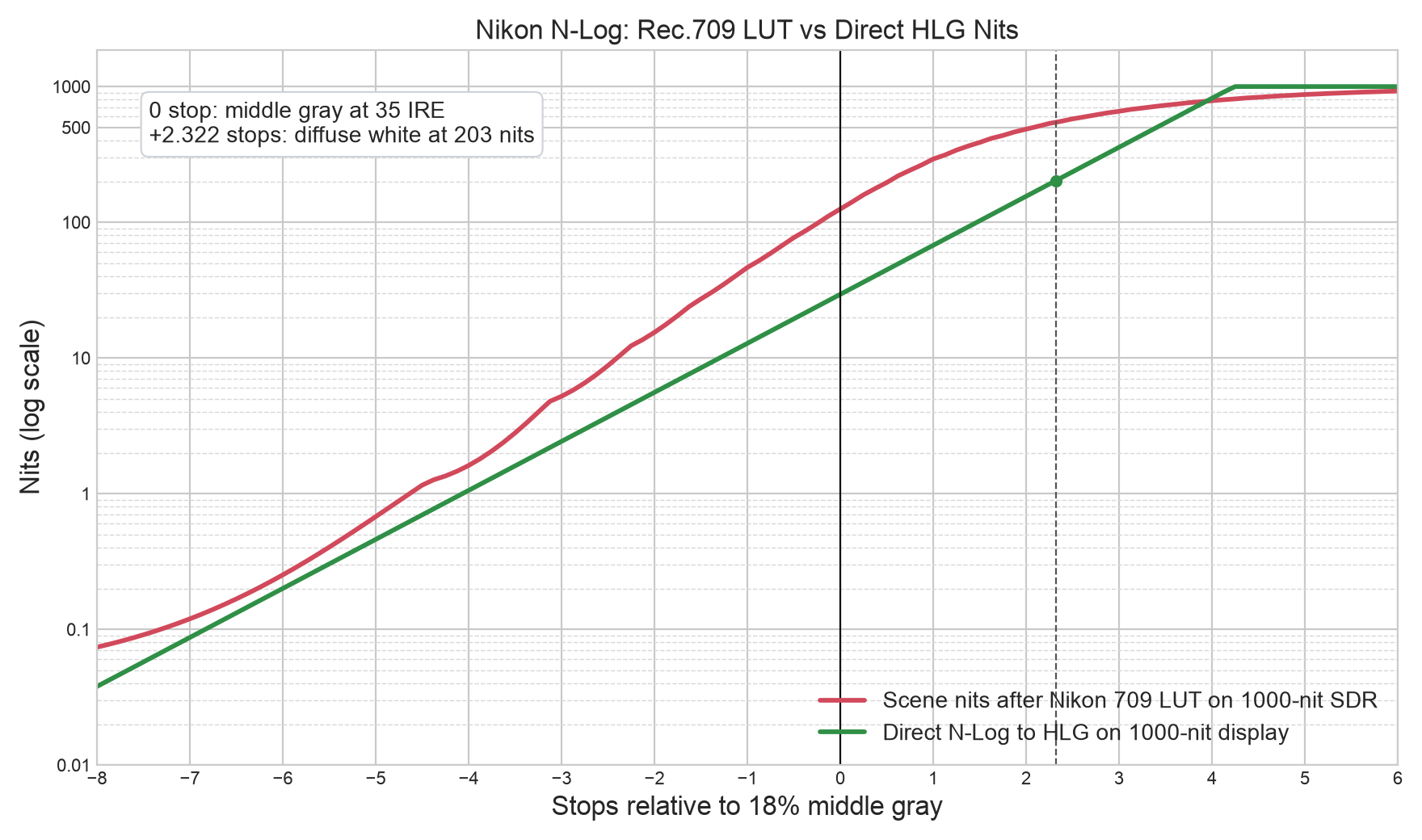
I compared Nikon’s official N-Log to Rec.709/BT.1886 LUT against a direct technical HLG conversion. Both are viewed on a 1000-nit display. The exposure assumption is middle gray at 35 IRE, with HLG diffuse white anchored at 203 nits.
The numbers are revealing. At 0 stop middle gray, the Nikon Rec.709 LUT outputs 42.07 IRE, which becomes about 125 nits on a 1000-nit SDR display model. The direct HLG conversion for the same input is only about 29 nits. Rec.709 middle gray is therefore about 2.09 stops brighter than HLG. At -2 stops, Rec.709 is about 15.4 nits, while HLG is about 5.6 nits, still a 1.47-stop lift.
This is why N-Log can look noisy after being restored to Rec.709. The LUT is not magically creating noise. It is taking shadow information that was recorded in low-code-value, low-SNR regions and lifting it into a much more visible display range. In the old 100-nit SDR world, those shadows might have stayed hidden at only a few nits. On a modern bright SDR screen, they may sit at tens of nits, where noise, chroma crawl, and compression artifacts become obvious.
So for a Rec.709 SDR delivery, especially for phones, OLED TVs, and XDR displays, N-Log often benefits from ETTR. The goal is not to make the final image brighter. The goal is to record the subject, midtones, and shadows in cleaner code values without clipping important highlights. Then, when the image is brought back down in grading, the noise floor is not amplified as aggressively.
HDR/HLG works differently. A technical HLG conversion keeps middle gray lower and saves room for highlights. In the table, diffuse white at +2.32 stops is 203 nits. By +4 stops, HLG reaches about 820 nits while Rec.709 SDR is about 787 nits. At +5 and +6 stops, HLG hits 1000 nits, while Rec.709 is compressed around 874 and 927 nits. That is the point of HDR: not making everything bright, but preserving scene contrast so bright things can actually be bright.
This is why aggressive ETTR can be counterproductive for HDR. It may clean up shadows, but it also pushes skies, lamps, reflections, and skin highlights closer to the top of the HLG range, where highlight separation can be lost. For HDR delivery, the priority is often highlight protection and natural midtone placement, not simply filling the waveform.
In short: modern 1000-nit SDR makes Rec.709 N-Log shadows and midtones very visible, so ETTR is often valuable for noise control. HDR/HLG keeps middle gray lower and reserves headroom for highlights, so it does not always need aggressive ETTR unless the scene has no important highlights to protect.