Press "Enter" to skip to content

Posts tagged as “SDR”

为什么 N-Log 做 Rec.709 更需要 ETTR,而做 HDR/HLG 反而不一定

现代手机上的 SDR 已经不是传统意义上的 100 nits SDR 了。很多 OLED 手机、平板和 XDR 屏幕在播放普通 SDR 内容时,也能把白场或高亮 UI 推到几百甚至 1000 nits。也就是说,一个 Rec.709 视频虽然技术上仍是 SDR,但它在真实观看环境里的亮度,早就和“100 nits 参考监视器”相差很远。这个变化会直接影响我们怎么曝光 N-Log。

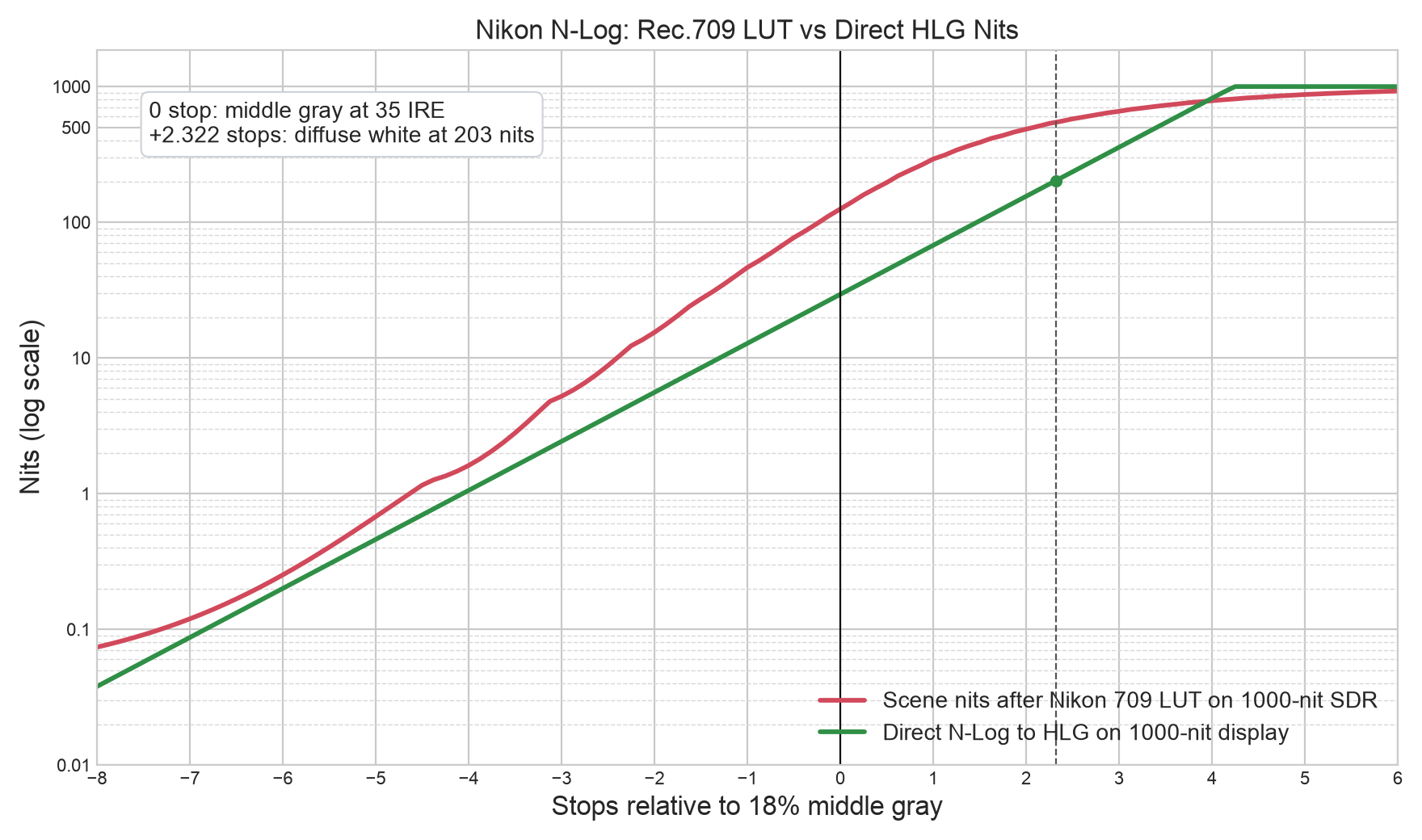
我用 Nikon 官方 N-Log 到 Rec.709/BT.1886 LUT 做了一组计算,并和一个不经过 LUT 的 HLG 技术转换比较。两边都假设显示器峰值是 1000 nits;拍摄端假设中灰曝光到 35 IRE,HLG 漫射白锚定到 203 nits。

结果很说明问题。中灰 0 stop 时,N-Log 经过 Rec.709 LUT 后是 42.07 IRE,在 1000 nits SDR 显示模型下约为 125 nits;同一个输入做 direct HLG 只有约 29 nits。也就是说,Rec.709 版本的中灰比 HLG 亮大约 2.09 stops。再看 -2 stops 的暗部,Rec.709 是 15.4 nits,HLG 是 5.6 nits,前者仍然亮约 1.47 stops。

StopsN-Log IRERec.709 SDR nitsDirect HLG nitsRec.709 vs HLG
-416.491.61.1+0.61 stops
-223.0015.45.6+1.47 stops
035.00125.229.4+2.09 stops
+2.3257.20545.5203.0+1.43 stops
+474.26786.7819.7-0.06 stops
+584.42874.21000.0-0.19 stops

这就是为什么 N-Log 还原到 709 后,暗部噪点经常显得特别多。噪点不是 LUT “凭空制造”的,而是拍摄时落在低码值、低信噪比区域里的暗部信息,被 Rec.709 tone curve 和现代高亮 SDR 屏幕一起抬到了很容易看见的位置。以前 100 nits SDR 时代,暗部可能藏在几 nit 里;现在它可能被显示到十几、几十 nit,观众自然更容易看到脏、浮、彩噪和压缩痕迹。

所以如果最终目标是 Rec.709 SDR,尤其是给手机、OLED 电视、XDR 屏幕观看,N-Log 往往更需要 ETTR。ETTR 的目的不是让成片更亮,而是在不剪掉重要高光的前提下,把主体、中间调和暗部尽量放到更高、更干净的编码区域。后期再用 LUT 或调色压回正常亮度时,噪声不会被放大得那么难看。

HDR/HLG 的逻辑不一样。HLG 技术转换会把中灰放得更低,给高光保留空间。表格里 +2.32 stops 的漫射白是 203 nits,到了 +4 stops,HLG 已经约 820 nits,而 Rec.709 SDR 约 787 nits;+5 和 +6 stops 时 HLG 直接到 1000 nits,Rec.709 则被压在 874 和 927 nits 附近。HDR 的价值就在这里:不是把整张画面抬亮,而是保留真实光比,让亮的东西真的亮。

因此,做 HDR 时盲目 ETTR 反而可能有害。你把 N-Log 整体往右推,确实能让暗部更干净,但也更容易把天空、灯光、反射和皮肤高光推到 HLG 顶部,失去 HDR 最珍贵的高光层次。HDR 交付更应该优先保护高光、保持自然中灰,而不是单纯追求波形图“用满”。

一句话总结:Rec.709 SDR 在现代 1000 nits 屏幕上会把 N-Log 的暗部和中间调显示得很亮,所以更需要 ETTR 来换信噪比;HDR/HLG 则把中灰放低、把空间留给高光,所以不一定需要激进 ETTR,除非场景本身没有重要高光可失去。

Why N-Log Needs More ETTR for Rec.709, but Not Necessarily for HDR/HLG

Modern phone SDR is no longer the old 100-nit SDR we used to imagine. Many OLED phones, tablets, and XDR displays can show ordinary SDR content at several hundred nits, sometimes close to 1000 nits. So even if a video is technically Rec.709 SDR, its real viewing brightness can be far beyond the traditional 100-nit reference. That changes how we should expose N-Log.

I compared Nikon’s official N-Log to Rec.709/BT.1886 LUT against a direct technical HLG conversion. Both are viewed on a 1000-nit display. The exposure assumption is middle gray at 35 IRE, with HLG diffuse white anchored at 203 nits.

The numbers are revealing. At 0 stop middle gray, the Nikon Rec.709 LUT outputs 42.07 IRE, which becomes about 125 nits on a 1000-nit SDR display model. The direct HLG conversion for the same input is only about 29 nits. Rec.709 middle gray is therefore about 2.09 stops brighter than HLG. At -2 stops, Rec.709 is about 15.4 nits, while HLG is about 5.6 nits, still a 1.47-stop lift.

This is why N-Log can look noisy after being restored to Rec.709. The LUT is not magically creating noise. It is taking shadow information that was recorded in low-code-value, low-SNR regions and lifting it into a much more visible display range. In the old 100-nit SDR world, those shadows might have stayed hidden at only a few nits. On a modern bright SDR screen, they may sit at tens of nits, where noise, chroma crawl, and compression artifacts become obvious.

So for a Rec.709 SDR delivery, especially for phones, OLED TVs, and XDR displays, N-Log often benefits from ETTR. The goal is not to make the final image brighter. The goal is to record the subject, midtones, and shadows in cleaner code values without clipping important highlights. Then, when the image is brought back down in grading, the noise floor is not amplified as aggressively.

HDR/HLG works differently. A technical HLG conversion keeps middle gray lower and saves room for highlights. In the table, diffuse white at +2.32 stops is 203 nits. By +4 stops, HLG reaches about 820 nits while Rec.709 SDR is about 787 nits. At +5 and +6 stops, HLG hits 1000 nits, while Rec.709 is compressed around 874 and 927 nits. That is the point of HDR: not making everything bright, but preserving scene contrast so bright things can actually be bright.

This is why aggressive ETTR can be counterproductive for HDR. It may clean up shadows, but it also pushes skies, lamps, reflections, and skin highlights closer to the top of the HLG range, where highlight separation can be lost. For HDR delivery, the priority is often highlight protection and natural midtone placement, not simply filling the waveform.

In short: modern 1000-nit SDR makes Rec.709 N-Log shadows and midtones very visible, so ETTR is often valuable for noise control. HDR/HLG keeps middle gray lower and reserves headroom for highlights, so it does not always need aggressive ETTR unless the scene has no important highlights to protect.

再谈苹果XDR显示器与HDR之殇

我之前有一篇文章聊过苹果的MBP的XDR显示器,以及为什么“正确”调色过的SDR在它上面效果如此之好,以至于连HDR都黯然失色。Why SDR looks so good on Apple’s XDR display that even shadows HDR?

其实很简单:苹果的XDR显示器把普通的SDR内容HDR化了,高光部分没动,只是把暗部压暗了很多,接近5档!

一谈HDR,很多人上来就吹什么动态元数据什么的。抛开色彩不谈,HDR的字面意思就是高动态范围,就是指内容最终在显示设备上呈现时最亮的地方和最暗的地方的比值,能超过一个数值(比如10档/1024)就可以称为HDR了,物理学就是这么简单。

XDR显示器在呈现Rec. 709 (Gamma 2.22)的内容时,IRE 50%~100%时和标准曲线基本吻合。但在50%以下的部分,对比度会慢慢增加,低于10%之后,黑化愈发明显。播放有损压缩视频时,暗部色块和断层基本不可见,显示效果大幅提升,正所谓一黑遮百丑。谁叫人家能黑的下去呢!标准的Rec. 709曲线在最大亮度500nit时,1% IRE的亮度为1.11nit,动态范围8.8档。但在XDR显示器上,实测100% IRE 450nit, 1% IRE 0.04 nit,动态范围13.5档,这还不算HDR吗?

Rec. 709在普通LCD显示器和XDR显示器上的暗部区别巨大(相机直拍)

后记

XDR的MBP发布已经近4年了,现在最新的iPhone/iPad以及安卓阵营在SDR最大亮度上早已超过了它,达到1000nit或以上,至少14档的显示动态范围使得SDR被HDR化有过之无不及。最高2000nit的激发亮度使得HDR的高光也就比SDR多1档,食之无味弃之可惜,普及遥遥无期~此时JPEG说我真的还能再活500年!

Why SDR looks so good on Apple’s XDR display that even shadows HDR?

Apple released their Apple Sillicon based Macbook Pro in October 26, 2021 which includes a new MicroLED display which they call XDR with a peak brightness of 1600 nits. Three years later, it’s still one of the best display for both SDR and HDR content consuming and creation. However, SDR content looks so good on the new XDR displays, sometime I even think that they were HDR content. Why is that? Let us figure out together.

Presets

The new XDR display includes a few presets:

  • Apple XDR Display (P3-1600 nits)

The default one for daily usage which has a peak brightness of 1600 nits for HDR content and 500 nits for SDR / UI.

  • Apple Display (P3-500 nits)

Peek brightness of 500 nits.

  • HDR Video (P3-ST 2084)

HDR reference mode. Can not adjust the brightness which peaks at ~1000 nits for HDR content and ~100 nits for SDR content / UI.

  • HDTV Video (BT.709 – BT.1886)

SDR reference mode. Can not adjust the brightness which peaks at ~100 nits for all content and UI.

500 nits for SDR?

Apple has been using 500 nits for SDR / UI for a very long time. Wait, shouldn’t SDR be 100 nits max? Yes, in theory and in some reference modes. Morden displays have a peak brightness of 300+ nits, not to mention the latest M4 iPad Pro that has a peak brightness of 1000 nits for SDR!!! In today’s standard, 100 nits is too dark to watch even in normally lit indoor environment.

Let’s see how Apple displays SDR content in their XDR displays:

Setup: I created a video with a black square and incrased IRE value of it until it becomes white in Rec. 709 colorspace / gamma. Then used a SM208 screen luminance meter to measure the brightness of the XDR display under different presets.

Here’re curves of screen brightness v.s Rec. 709 IRE values:

After the test, I found that Apple XDR Display (P3-1600 nits) and Apple Display (P3-500 nits) have the same response curve for SDR content, so only drew one line here. They (the red curve) peaked around 450 nits, close to claimed 500 nits (my screen might be degraded a bit after two and half years), middle gray (~40% IRE) is aboud 77 nits, black (0% IRE) is 0.05 nits.

In SDR reference mode (HDTV BT.709-BT.1886 preset), the blue curve, peek brightness is 94 nits, very close to the 100 nits for SDR. Middle gray is a little bit darker at 11 nits, black (0% IRE) is all the way down to 0.02 nits!

I also plot a Gamma 2.4 curve for a 100 nits reference monitor (the yellow curve), you can see that it overlaps well with the SDR reference mode for bright part (60%+ IRE), it lays in between of two modes, its dark region (<1 IRE%) is brighter than both modes and will be even brighter on a real CRT monitor that the SDR standard was designed for.

For comparison, I also measured my BenQ PD3200U which still looks great for most of the SDR content. In sRGB mode, it peaks at 350 nits, the 1% IRE signial is clearly visible and measured at 0.91 nits, pure black is 0.34 nits, contrast ratio is just over 1000:1, no true black is the major drawback of LCD displays. XDR is brighter for the highlights and darker in the shadows.

The curve itself explains why properly graded SDR (Rec. 709) content looks so good in Apple’s XDR Displays: it tracks the gamma curve pretty well for the most part (30%+ IRE), pure white is very bright (450+ nits), and pure black is very dark (0.05 nits), the constrat ratio is around 9000:1 (13+ stops dynamic range).

What about HDR?

I did a similar test for HDR, using ITU-R BT.2100 (HLG) gamma. Here’re the results:

Let’s first look at the HDR reference mode (HDR Video P3-ST2048 preset), the yellow curve, it tracks the HLG curve very well, it’s a straight line (in log scale) after 50% IRE. HDR reference mode peaks at 881 nits (100% IRE), diffuse white 183 nits (75% IRE), both are a little bit darker than the reference values which is 1000 nits and 203 nits respectfully, middle gray is accurate though, around 26 nits (38% IRE), black is 0.02 nits! (0% IRE), It gives us a contrast ratio of ~44000:1, 15 stops+ dyanmic range.

The XDR mode (red curve) is always brighter comparing to the HDR reference mode: 2+ stops in black and deep shadows (0 ~ 10% IRE), 1+ stops (10% ~ 85% IRE) for most of the part and < 1 stops for highlights (85%+ IRE), it curved / saturated after 95% IRE, and peeked at 1450 nits! (100% IRE) , diffuse white 410 nits (75% IRE), close to white in SDR/UI (which is 450 nits), middle gray is around 68 nits (38% IRE), a little bit darker than SDR mode, black is 0.03 nits (0% IRE). It gives us a contrast ratio of ~50000:1, also 15 stops+ dyanmic range.

HLG as a backward compatible curve, I also tested the Apply Display 500 nits mode (the blue curve), it lays between XDR and HDR reference mode for the most of the part and clipped after 90% IRE with a peek brightness of 450 nits (same for SDR content), diffuse white is 219 nits (75% IRE), middle gray is 38 nits (38% IRE) and black is 0.04 nits (0% IRE).

PQ is another story

The HDR reference mode tracks the PQ curve perfectly, it’s a straight line from 0 to 1000 nits and clipped after that.

Both 1600-nits and 500-nits mode didn’t do a good job, they are one stop brighter for shadows and then gradually curved.

Conclusion

Apple’s XDR Display is fantastic, very good in SDR mode: 450+ nits peak brightness, true blacks, 13+ stops of dyanmic range put a lot of “HDR displays” to a shame. You can definitly call it HDR since 100-nits-max, 200:1 constrat ratio SDR is dead for many years. HDR content in XDR mode is also great with a peak brightness of 1450+ nits, 15+ stops dynamic range. However, highlights is only 1.7 stops brighter than UI/SDR white. Idealy, highlights should be at least 3 stops brighter than diffuse white, since people is alreay used to have 500 nits for UI/SDR white, then a 4000+ nits peak brightness display is needed. Setting diffuse white to 203 nits (recommended for HLG masted at 1000 nits), the requirement drops to 1600 nits (it’s not a coincidence), however, (diffuse) white will looks gray since it’s 1.3 stop darker than UI.

I know it’s xxx nits everywhere since human eyes are much more sensitive in luminance than in colors and a lot of “HDR” content are way over saturated!